



I vividly recall the palpable, almost frantic groan that rippled across the SEO landscape when Google dropped the bomb: Universal Analytics (UA) was being put out to pasture. For what felt like an eternity, we’d leaned heavily on its comforting dashboard. We knew its session-based quirks. We understood its bounce rates. Diving headfirst into Google Analytics 4 (GA4)? Well, I’ll be totally honest. Our agency felt like a toddler learning to navigate a staircase for the very first time. Everything was jarringly unfamiliar. Metrics had morphed into entirely new beasts, and the bedrock data model abruptly abandoned “sessions” in favor of “events.”
Yet, here’s the wild twist. Once the dust settled and we clawed our way past that steep learning curve, a profound realization hit us. GA4 isn’t merely an update. It’s a colossal, steroid-injected upgrade for advanced SEO tracking. By hyper-focusing on the raw reality of how humans actually tinker with our websites, it paints an astonishingly crisp portrait of organic traffic behavior. Today, I’m pulling back the curtain on a recent client project. We rigged GA4 specifically to harvest advanced SEO intel. Go ahead, grab your caffeine of choice. Let’s dissect the precise, step-by-step evolution that morphed this initially intimidating platform into an absolute juggernaut for our search optimization playbook.
Why We Love GA4 for Advanced SEO Tracking
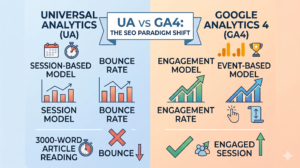
Before we plunge elbow-deep into the technical configuration, let’s talk about the *why*. Why are we suddenly singing GA4’s praises? Back in the dusty UA era, the “session” ruled all. Picture this: a visitor clicks your link, digests a gargantuan 3,000-word manifesto for fifteen minutes, and then closes the tab without clicking another page. UA would mercilessly stamp that as a “bounce” – a total flop. For SEOs pouring blood, sweat, and tears into epic content, this was maddeningly unfair.
Enter GA4, entirely upending the rulebook with its event-driven architecture. Every single solitary action, a fleeting pageview, a deep scroll, a paused video, a downloaded PDF – registers as a distinct event. Finally, we have the tools to capture genuine, authentic engagement! We can monitor the exact pixel depth an organic reader scrolls to. We know the second they snatch an email address or click an outbound affiliate banner. For high-stakes SEO campaigns, this granular treasure trove lets us validate the hard-dollar worth of our content. We’re officially done with flimsy vanity metrics.
Phase 1: The Core Setup and Enhanced Measurement
Our expedition kicked off at the absolute foundation. We dug into the GA4 Admin labyrinth and spun up a brand-new property. Pro tip? Always, *always* route your GA4 configuration tags through Google Tag Manager (GTM). It keeps the site’s source code immaculate and prevents colossal headaches when you inevitably want to track weird, ultra-specific events down the road.
The second that base tag started pinging successfully, we lunged for Enhanced Measurement. Honestly? It’s arguably my favorite “lazy win” in the entire platform. By flipping a single, unassuming toggle inside the Web Data Stream settings, GA4 magically begins vacuuming up vital interactions without requiring a single line of custom code. Instantly, we had eyes on scroll depth (triggering at that golden 90% threshold), outbound clicks, internal site searches, video views, and file downloads.
For our specific SEO mandate, tracking internal site searches was akin to striking oil. Watching what users desperately typed into the site’s search bar *after* arriving via Google exposed massive, gaping holes in our content strategy. When dozens of organic visitors frantically searched for “pricing” upon landing, the message couldn’t have been louder. Our pricing details were buried, and our organic landing pages were failing to serve the user’s immediate intent.
Phase 2: The SEO Holy Grail – Linking Google Search Console
You frankly have no business discussing elite SEO tracking if you aren’t inviting Google Search Console (GSC) to the party. GA4 is phenomenal at unmasking what people do *after* they breach your digital walls. But GSC? GSC is the roadmap of *how* they breached them—the raw queries, the fleeting impressions, the click-through rates. Fusing these two platforms together isn’t optional. It’s mandatory.
So, we ventured back into the Admin panel, hunted down “Product Links,” and clicked “Search Console Links.” A quick authorization later, and the data pipes were officially open. But beware – GA4 has a famously quirky sense of humor. Hooking up GSC doesn’t magically populate the reports in your default left-hand navigation menu. You have to force its hand.
We detoured to the somewhat hidden “Library” folder at the bottom of the Reports tab. Lurking in the shadows was the unpublished Search Console collection. Hitting “Publish” felt like unlocking a secret vault. Two immensely potent reports suddenly materialized in our sidebar: the Google Organic Search Queries report and the Google Organic Search Traffic report. The payoff? We could scrutinize a single landing page, viewing its pre-click search query dominance alongside its post-click behavioral metrics. It was a harmonized, beautiful view. Our data-nerd hearts skipped a beat.
Phase 3: Defining and Tracking Advanced SEO Conversions
Traffic is a fantastic ego boost, sure. But conversions keep the lights on. In the old days, we leaned heavily on rudimentary destination goals – did they hit the “Thank You” page? Yes or no. While that clunky method survives in GA4, the new event-centric ecosystem unlocks absurdly sophisticated conversion tracking.
We huddled with our client to sketch out the master plan. We needed macro-conversions (the big stuff: form fills, finalized purchases) and micro-conversions (the breadcrumbs: downloading an SEO checklist, joining the newsletter, surviving a two-minute explainer video). Firing up GTM, we constructed bespoke events for every single one of these actions and aggressively funneled them straight into GA4.
The moment those fresh events populated inside the GA4 Admin interface, we simply flicked the switches to upgrade them to “Conversions.” But we wanted more. We craved attribution. Which specific organic assets were actually moving the needle? By diving into the Traffic Acquisition report, isolating “Organic Search,” and slapping on a secondary dimension, we ruthlessly dissected our blog posts. We knew exactly which long-form guide generated the newsletter spikes and which service page triggered the most lucrative lead forms. Armed with that crystal-clear reality, we pivoted the entire content calendar toward topics that genuinely padded the bottom line.
Phase 4: Building Custom Explorations for Organic Traffic
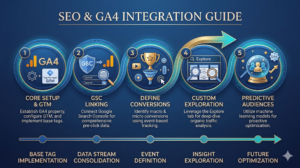
If you genuinely want to earn the “advanced” label in your SEO tracking, you have to abandon the kiddie pool and wade out into the “Explore” tab. Standard GA4 reports are cute. Custom Explorations are where the actual magic happens. This is our laboratory. It’s where we resurrect the beloved UA views we stubbornly refuse to let go of, while simultaneously inventing radically new ones.
The very first beast we built was our proprietary “Organic Landing Page Performance” matrix. Starting from a Blank Exploration, we loaded the Variables column with dimensions like “Landing page + query string” and “Session default channel group.” Then, we dragged in the heavy-hitting metrics: “Sessions,” “Engaged sessions,” “Engagement rate,” and naturally, “Conversions.”
Dropping these into the Tab Settings and applying a strict “Organic Search” filter instantly manifested a flawless, high-resolution snapshot of our SEO performance. We could quickly sort by Engagement Rate to pinpoint the exact narratives mesmerizing our readers. Conversely, sorting by Conversions instantly highlighted our stealthiest money-makers.
We didn’t stop there. The Path Exploration tool became our secret weapon for internal link optimization. We’d anchor a top-performing organic entry point and watch the sprawling tree graph unfold, mapping exactly where users wandered next. Did that top-of-funnel visitor actually click the embedded link pointing to our core service page? If the visual path showed a sudden drop-off, we knew our calls-to-action were criminally weak and needed an immediate rewrite.
Google Analytics 4 shifts the focus from simply counting pageviews to understanding the entire user journey. By leveraging custom explorations and event-based tracking, SEO professionals can finally measure the true business impact of organic search, rather than just chasing vanity metrics.
Phase 5: Redefining Success with Engaged Sessions
I hinted earlier at our deep, simmering hatred for the archaic bounce rate. Let’s talk about its replacements: Engaged Sessions and Engagement Rate. Switching to this paradigm altered how we justify our SEO retainers to clients practically overnight.
GA4 defines an “Engaged Session” by a refreshingly logical set of criteria. Did the user stick around for more than 10 seconds? Did they trigger a conversion? Did they load at least two distinct pages? If they hit *any* of those milestones, boom – they are engaged. The Engagement Rate is simply the mathematical slice of total sessions that meet this threshold.
Consider this scenario: We managed a hyper-technical blog post targeting a painfully obscure long-tail keyword. It dominated position one, hauling in thousands of organic eyeballs monthly. Under Universal Analytics, it flaunted a terrifying 85% bounce rate. The client was perpetually sweating over it. Yet, when we ported that exact URL into GA4’s lens? It boasted a phenomenal 65% Engagement Rate!
What caused the massive gap? Reality. Users were clicking the link, finding the incredibly dense, nerdy answer they desperately needed, absorbing it for three solid minutes, and then peacefully exiting. They were happy, utterly satisfied searchers. GA4 finally handed us the empirical proof that our highly specialized content was nailing search intent – even if the user never clicked a second link. Grasping this nuance is the only way to fairly judge informational SEO assets.

Looking Ahead: The Power of Predictive Audiences
With the core scaffolding in place, we started poking around GA4’s futuristic machine learning toolkit, specifically, its predictive metrics. Because the platform gorges on such a rich diet of event data, it can literally attempt to foresee the future, guessing metrics like purchase probability or the likelihood of churn.
Normally, media buyers hoard this feature for retargeting ads. But we stumbled onto a genius application for organic search. We sculpted a custom audience consisting exclusively of users who arrived via organic search and possessed a high mathematical probability of converting within the next 7 days. Stalking the behavioral footprints of this “likely-to-buy” cohort revealed fascinating quirks. We spotted a glaring trend: visitors who consumed specific client case studies and peeked at the “About Us” page converted at absurdly high rates. Armed with this clairvoyance, we retrofitted our highest-traffic blog posts to aggressively funnel readers directly toward those specific case studies and the team page.
Transitioning your SEO tracking infrastructure to Google Analytics 4 is, undeniably, a bit intimidating. It demands a totally different philosophical approach and the patience to stumble through an alien interface. But as we discovered in the trenches, the sheer depth of behavioral intelligence you extract is staggering. By fully buying into event-driven logic, marrying your data with Search Console, crafting bespoke explorations, and prioritizing authentic engagement, GA4 rapidly morphs from a confusing chore into your most lethal SEO weapon.
Frequently Asked Questions
How long does it take for GA4 data to show up after setup?
Honestly? You’re going to need a hefty dose of patience right out of the gate. While you can totally peek at the “DebugView” to watch your newly minted events fire in real-time (just to make sure nothing is horribly broken), the standard reporting dashboards are a bit sluggish. They usually take a solid 24 to 48 hours to fully bake. So, if your screen looks like a desolate wasteland immediately after hitting publish, take a breath. Check back tomorrow. Your organic numbers will start trickling in soon enough.
Can I migrate my historical Universal Analytics data into GA4?
The short, painful answer is no. Because UA and GA4 speak entirely different languages (sessions versus events), trying to cram your old data into the new property is like fitting a square peg into a round hole. It just doesn’t work. This is exactly why we aggressively hounded our clients to run dual-tagging setups during the awkward transition phase. If you want to keep your legacy UA metrics alive for year-over-year comparisons, you’ll have to manually export those old reports into CSVs, stash them in Google Sheets, or dump them into a serious warehouse like BigQuery.
Why are my GA4 organic traffic numbers different from Google Search Console?
Oh, we field this panicked question on a weekly basis! Take a deep breath – it is completely, 100% normal for these two tools to disagree. Here’s the deal: Google Search Console tallies “Clicks” the split second someone taps your link on the actual search results page. GA4, on the other hand, registers a “Session” only *after* your website actually loads and the tracking script fires. If a user clicks your link but abruptly closes their browser tab before the page renders, GSC celebrates a click, but GA4 sees absolutely nothing. Throw in the fact that GA4 handles returning users with its own complex logic, and you’re always going to see a data gap.
What is the best way to track keyword rankings in GA4?
Here’s the blunt truth: GA4 is a terrible rank tracker because it wasn’t built to be one. Yes, syncing up Google Search Console lets you glimpse the raw search queries funneling traffic your way directly inside the GA4 interface. But it is emphatically *not* going to chart your day-to-day keyword fluctuations or monitor volatile SERP features like a dedicated tool would. We utilize GA4 strictly to measure the *aftermath* of our rankings—the resulting traffic, the user engagement, the hard conversions. For the actual daily grind of tracking keyword positions, we rely heavily on specialized third-party SEO software.