



Ever hunted down a recipe online and spotted a result flaunting a drool-worthy photo, a star rating, prep time, and calorie stats right on the search page? Or maybe you Googled a weekend gig and noticed dates and venues neatly stacked under a snippet. Wondering how those sites scored that prime, flashy real estate? You’ve stumbled into the right corner of the internet. The magic sauce is Schema Markup. Today, we’re dissecting it.
Looking back at my early days in the SEO trenches, the idea of injecting invisible code to “whisper” to search engine bots felt like deciphering ancient runes. But then it clicked. I saw how this digital sorcery translates directly into skyrocketing click-through rates. I was obsessed. In this guide, I’ll walk you through the guts of schema, how it spins out those gorgeous rich snippets, and how to slap it onto your own pages. Grab a coffee. Let’s unmask the technical wizardry.
What Exactly is Schema Markup?
Let’s ditch the jargon for a second. Schema markup is basically a universal translator made of microdata. It’s a standardized dictionary of tags you drop into your HTML to help search engines decode and gorgeously display your webpage. Search engines are brilliant, sure. But context? They still fumble that.
Take the word “Avatar.” Is your page discussing James Cameron’s blue-alien mega-hit, Aang from the animated series, or a simple forum profile pic? Without a nudge, Google is left guessing. Schema obliterates that guesswork. By wrapping specific text chunks in this code, you explicitly declare: “Hey! This is a Movie. Its title is Avatar. The director is James Cameron, and it lives in the Sci-Fi genre.”
This whole vocabulary stems from a bizarrely harmonious collaboration. Back in 2011, fierce rivals (Google, Bing, Yahoo, Yandex) agreed they desperately needed a shared language to parse the messy web. Thus, Schema.org was forged. Think of it as a massive repository. Today, it hosts hundreds of “types” (Person, Organization, Event) and thousands of “properties” (price, datePublished) to label pretty much anything under the sun.
Understanding Rich Snippets
If schema is the invisible stagehand, rich snippets are the dazzling Broadway stars. A “snippet” is just the normal search result. You know the drill: blue link, green URL, drab black text. Functional? Yes. A total snooze? Absolutely.
Enter the “rich snippet” (or rich result). It takes that vanilla listing and injects it with steroids—pulling visual and interactive goodies straight from your hidden schema. Depending on what you’ve tagged, a searcher might see glowing star ratings, stock status, thumbnail graphics, event calendars, or even an embedded podcast player.
Why the fuss? Because humans are lazy, visual creatures. Scanning a wall of text is tedious. Our eyes snap immediately to images and stars. I’ve watched clients bump their organic click-through rates (CTR) by a massive thirty percent overnight just by slapping on an FAQ or Review schema. No ranking change. Just a sexier, larger, impossible-to-ignore search listing.
Why Schema Matters for Technical SEO
“Does this actually boost my rankings?” I hear this constantly. The blunt answer? No. Google swears up and down that structured data isn’t a direct ranking signal like a juicy backlink. But the backdoor benefits are so colossal that skipping schema in modern SEO is practically self-sabotage.
Primarily, it’s about entity understanding. We aren’t just matching exact-match keyword “strings” anymore; we’re dealing with “things.” Schema feeds Google’s Knowledge Graph directly. You’re explicitly mapping out who you are, what you sell, and who writes your stuff. That clarity breeds trust. And trust? That’s the bedrock of longevity in search.
Then there’s the traffic loop. Schema births rich snippets. Rich snippets balloon your CTR. More clicks equal more eyeballs. And when folks get exactly what they expected—because your snippet was brutally accurate, they don’t bounce back to search. That slick user engagement absolutely moves the needle over time.
Plus, you’re future-proofing. Voice search and AI overviews rely heavily on neatly categorized data. When someone yells a question at their smart speaker, that robot often plucks the answer straight from Speakable or FAQ schema. Get your data house in order now, and you won’t be left behind when the AI bots take over.
The Three Formats of Structured Data
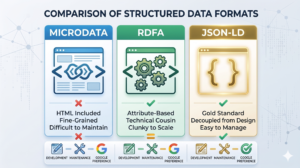
Before writing a single line of code, we have to pick our poison. Schema.org gives us the dictionary, but there are three distinct dialects you can use to speak it: Microdata, RDFa, and JSON-LD. Let’s weigh them.
1. Microdata
Microdata forces you to weave schema tags directly into your visible HTML. You end up wrapping your text in convoluted span or div tags. Does it work? Sure. Is it a nightmare? Absolutely. It’s tedious, fragile, and if a designer tweaks a template, your SEO breaks. Marrying front-end design to backend SEO data is just begging for a massive headache.
2. RDFa
RDFa (Resource Description Framework in Attributes) is Microdata’s slightly nerdier cousin. It also relies on injecting attributes into existing HTML tags. While popular in certain publishing circles, it carries the exact same baggage. It’s clunky, a massive pain to scale, and a nightmare to debug when things go sideways.
3. JSON-LD (The Gold Standard)
Enter JSON-LD (JavaScript Object Notation for Linked Data). This is Google’s darling. Honestly, it’s the only format I ever touch. Instead of mangling your page’s visual HTML, JSON-LD lets you drop a single, elegant block of code into the head or body of your document. All your structured data lives neatly in one place.
Because it’s decoupled from the design, you can overhaul your CSS or shuffle page elements without nuking your schema. It’s a breeze to write, effortless for developers to automate through a CMS, and dead simple to troubleshoot. For the rest of this guide, JSON-LD is our weapon of choice.
The Anatomy of JSON-LD Schema
Staring at JSON-LD for the first time can make you a bit cross-eyed. But strip away the brackets, and it’s shockingly logical. It’s just a matching game of “keys” (the property names) and “values” (the actual data).
Every single JSON-LD script kicks off by setting the stage. The context is always “https://schema.org”—telling the bot which dictionary we’re using. Next comes the “type,” which defines the core topic. Are we talking about an “Article”, a “LocalBusiness”, or a “Product”?
After that setup, you just list the details. An “Article” gets properties like “headline” and “datePublished.” The real magic, though, is nesting. The “author” doesn’t have to be just a flat name. It can be an entirely new schema block labeled “Person,” packing their specific URL, job title, and social links. It’s boxes within boxes.
The Most Important Types of Schema for SEO
You don’t need to memorize the hundreds of types floating around Schema.org. Honestly, about seven heavy-hitters do ninety-five percent of the heavy lifting. Let’s look at the MVP list.
1. Article and NewsArticle Schema
Running a blog or publishing editorial pieces? Article schema is non-negotiable. It hands Google the headline, featured image, and author bios on a silver platter. For hard news, NewsArticle schema is the golden ticket to sneaking into the “Top Stories” carousel, which can trigger an absolute avalanche of traffic.
2. Product Schema
If you run an e-commerce gig, this is your lifeblood. Product schema serves up those gorgeous SERP additions: price, in-stock status, and review stars. I’ve watched shops double their organic revenue just by nailing this. Shoppers are infinitely more likely to click when they know the price and availability before they even hit your site.
3. LocalBusiness Schema
Brick-and-mortar folks, listen up. LocalBusiness schema is your secret weapon for neighborhood dominance. You explicitly feed Google your exact address, opening hours, coordinates, and phone number. This data pipelines straight into the “Local Pack” map results, keeping potential foot traffic informed and happy.
4. FAQPage Schema
This is arguably my favorite hack for stealing SERP real estate. Tag a list of questions and answers with FAQPage schema, and Google might generate a drop-down accordion right under your link. It physically bloats your search result, shoving competitors down the screen. Just play fair—only markup questions that humans can actually read on the page.
5. HowTo Schema
Got a step-by-step tutorial on “How to Bleed Brakes” or “How to Knit a Scarf”? HowTo schema lets Google extract your exact steps—sometimes with photos—and splash them across the search results. It establishes instant authority and hooks DIYers before they even click.
6. Recipe Schema
Food blogging is a bloodsport. Recipe schema is the armor. It powers those mouth-watering recipe carousels, flaunting prep times, calorie bombs, and user ratings. If you aren’t running Recipe schema on your culinary site, you effectively don’t exist.
7. Review and AggregateRating Schema
Review schema handles individual critiques, while AggregateRating does the math (e.g., “4.8 stars from 300 reviews”). This creates the coveted gold stars in the SERPs. Instant trust. Massive CTR boost. But tread carefully: Google hates self-serving reviews. You can’t stick 5 stars on your own corporate homepage, but you absolutely can on your products or courses.
Step-by-Step Guide: How to Implement Schema Markup
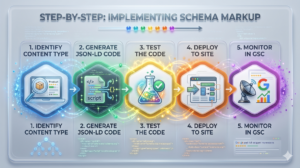
Theory is great, but how do we actually glue this stuff to a website? Here is the exact, battle-tested routine I run through when wiring up a new project.
Step 1: Identify the Content Type
Stop and look at your page. What is it, really? A sprawling guide? A t-shirt product page? Pick the single most accurate schema type. Don’t be that guy trying to mash “Recipe” and “LocalBusiness” together on a single landing page unless there’s a deeply logical, nested reason for it.
Step 2: Generate the JSON-LD Code
Good news: you don’t need a computer science degree. Plenty of free tools will spit out the JSON-LD for you. Google’s Structured Data Markup Helper is wonderfully idiot-proof. Paste a URL, highlight some text, click “Name,” and it writes the script.
Or, hit up a free online schema generator. Fill out a web form, and copy the output. If you’re a control freak (like me), spend an afternoon learning the basic syntax so you can hand-code or tweak it in Notepad.
Step 3: Test the Code Before Deployment
Do not skip this. Seriously. Before you push anything live, you have to verify it. One missing comma or rogue bracket will completely nuke the code.
Fire up Google’s Rich Results Test. Dump your JSON-LD in there. It will ruthlessly flag fatal errors in red and politely suggest missing fields in yellow. Keep tinkering until you get a bright green stamp of approval.
Step 4: Deploy the Code to Your Website
Got clean code? Time to inject it. The method depends heavily on your tech stack.
On WordPress? A heavy-duty SEO plugin will handle the basics (Article, Breadcrumbs) while you sleep. For custom stuff, plenty of plugins give you a blank box on each post to paste bespoke JSON-LD.
If you’re running a custom build, just drop the script into the HTML head. For massive enterprise beasts, Google Tag Manager (GTM) is a lifesaver. You can configure a Custom HTML tag to fire your snippet on specific URLs. It bypasses the development queue entirely, which is an SEO’s dream.
Step 5: Monitor and Maintain in Google Search Console
Schema isn’t a crockpot; you don’t just “set it and forget it.” Keep tabs on it via Google Search Console. Look under the “Enhancements” tab. Google logs every valid rich result it spots—and screams if something breaks. If a property goes rogue or Google shifts the goalposts on required fields, you’ll get an alert. Fix it fast before your rich snippets vanish.
Advanced Schema Strategies: Building the Knowledge Graph

Ready to level up? The real magic happens when you stop treating schema tags like isolated sticky notes and start treating them like a connected web.
We call this “Nesting” or “Node referencing.” Instead of shouting, “Here’s an Article” and “Here’s a Company,” you stitch them together. You declare: “This is an Article, penned by Person X, who collects a paycheck from Organization Y, which happens to be a LocalBusiness sitting at this Address.”
By linking these concepts using the “@id” tag in JSON-LD, you hand Google a perfectly drawn map of your business’s DNA. This hyper-clarity separates the amateurs from the pros. It dissolves confusion and cements your brand firmly into the Knowledge Graph.
Common Schema Mistakes to Avoid
Schema is a powerful tool, but misuse it, and Google will slap you with a manual penalty, stripping your rich snippets entirely. Watch out for these landmines:
Marking up hidden content: This is the cardinal sin. If it’s in your JSON-LD, a human better be able to read it on the screen. Claiming 500 reviews in the code while hiding them from users is a fast track to Google jail.
Using the wrong schema type: Don’t try to outsmart the system. Tagging a lawnmower as a “Recipe” just to get a flashy SERP feature is desperate, and the algorithm will catch you.
Missing required properties: You can’t snag a Product snippet without a price tag. Always cross-reference Google’s official developer docs so you don’t omit mandatory fields.
Self-serving reviews: Again, plastering a 5-star Review schema on your own corporate “About Us” page is dead. Reviews need to be objective and attached to specific items.
Expert Insights on the Future of Schema
The SEO game board is flipping over, largely thanks to generative AI. Structured data isn’t just a gimmick for pretty search results anymore; it’s the raw fuel for AI answers. Need proof? Listen to the folks in the trenches:
Schema markup is no longer just a nice-to-have visual enhancement; it is the fundamental bridge between human-readable content and machine-understandable entities in an AI-first search landscape.
That quote nails it. As search shifts toward AI summarizing the web on the fly, the sites that serve up meticulously labeled, machine-readable data are the ones those bots will cite.
Measuring the Impact of Your Schema Markup
So you did the work. Did it move the needle? Tracking schema ROI means ditching vanity metrics. Since it doesn’t directly bump your ranking position, obsessing over rank trackers is useless here.
You need to hunt for Click-Through Rate (CTR) and Impressions. Dive into Google Search Console’s Performance report and hit the “Search Appearance” filter. This isolates how your flashy rich results (FAQs, Products) are performing against the boring blue links.
Pro tip: grab a baseline CTR before you deploy. Wait three weeks. Then compare. If you won the snippet, you’ll almost always see a massive spike in clicks. You might even notice an impression bump, as rich data unlocks special carousels your plain-text competitors can’t touch.
Wrapping Up Our Schema Journey
We’ve chewed through a lot of data today. From deciphering Schema.org’s massive dictionary to hand-crafting JSON-LD and dodging penalties, you now have the blueprint to supercharge your technical SEO.
At the end of the day, schema is just communication. It’s about spoon-feeding search engines the exact context they crave. Start with the low-hanging fruit. Pick a flagship product or a blockbuster blog post, wire up the JSON-LD, and test it. Watch as your lifeless search listings morph into click-magnet rich snippets. Go get ’em.
Frequently Asked Questions
Does schema markup guarantee rich snippets?
Nope, it doesn’t. Slapping schema on a page just buys you a lottery ticket – it makes you eligible. Google’s algorithm holds the final veto power. It weighs the user’s exact query, your site’s overall clout, and content quality to decide if showing that flashy snippet actually helps the searcher.
Can I use schema markup on every page of my website?
Absolutely, and you probably should! The trick is matching the vibe of the page to the right code. Blogs get Article schema. Contact pages get LocalBusiness or Organization tags. Store items need Product schema. Whatever you do, don’t just blindly copy-paste the exact same snippet across your entire domain.
Is JSON-LD the only format I should use?
While dinosaurs like Microdata and RDFa technically still function, JSON-LD is the undisputed king. Google practically begs you to use it. It’s tidy, centralized, and won’t shatter into a million pieces when you redesign your homepage. Unless you are trapped in a bizarre, legacy tech nightmare, JSON-LD is your go-to.
How long does it take for rich snippets to appear after adding schema?
It’s a waiting game, usually spanning a few days to a couple of weeks. Google has to crawl the URL, digest the new structured data, and reshuffle its index. Want to poke the bear? Jump into Google Search Console and manually request indexing for those freshly updated pages to speed things up.
Will schema markup improve my organic rankings directly?
No. Google has been crystal clear: structured data is not a direct ranking lever. It won’t magically teleport you from the depths of page three to the top spot. But those rich snippets? They drastically inflate your click-through rate. That surge in traffic and solid user engagement absolutely creates a ripple effect that benefits your overall SEO health.