



Let’s drop the facade for a second: we’ve all suffered through this. You tap an intriguing article on your phone. And wait. And wait. Finally, the page paints onto your screen. You reach out to hit a button, but suddenly, the entire layout violently jerks downward. Congratulations, you’ve just clicked a massive, obnoxious ad instead. It’s maddening. You probably bounced off the site instantly, muttering under your breath. As a web developer, that is my absolute worst nightmare. We want visitors to feel invited and relaxed, not like they’re navigating a digital minefield.
That specific flavor of user rage is exactly why Google unleashed Core Web Vitals. Historically, SEO felt like a shady parlor trick. We stuffed keywords. We bought backlinks. But a few years back, Google woke up and moved the goalposts. They realized actual human experience needed to be a quantifiable, heavily weighted ranking factor. Enter Core Web Vitals: a hyper-specific batch of metrics built to gauge how real people experience a page’s visual stability, responsiveness, and raw speed.
If you’ve ever opened a Google Search Console dashboard, seen a blood-red wave of “Poor” URLs, and felt your soul leave your body – breathe. I’ve stared down that exact screen. I promise you, decoding these metrics isn’t a dark art. Today, we’re stripping away the jargon. We’ll dissect the big three – Largest Contentful Paint (LCP), First Input Delay (FID), and Cumulative Layout Shift (CLS) and I’ll hand over the exact tactics I use to fix them.
What Are Core Web Vitals Anyway?

Before drowning in alphabet soup, let’s get our definitions straight. These vitals are just one slice of Google’s overarching “Page Experience” pie. Back in the day, everyone obsessed over “Total Page Load Time.” Honestly? That metric was deeply flawed. A website might take twelve seconds to finish loading background trackers, but if the main headline and hero image pop up in a fraction of a second, the user thinks the site is blazing fast.
Google figured this out. They engineered Core Web Vitals to track perceived performance. They’re asking: How fast does the meat of the content show up? When I tap the screen, does it instantly react? Does the text jump around like a startled cat while I’m trying to read? By zeroing in on these three quirks, we build sites that don’t just appease algorithms, they genuinely delight people.
Largest Contentful Paint (LCP): Making a Great First Impression
Think of Largest Contentful Paint (LCP) as your digital handshake. It strictly measures how long it takes for the chunkiest piece of content to materialize on the screen. Usually, that’s a gigantic hero image, a heavy block of text, or a video thumbnail. When LCP triggers quickly, the user’s brain gets a hit of reassurance: Okay, the link works. The content is here.
Google’s benchmark? 2.5 seconds or less. Hit that, and you get a green “Good” checkmark. Drift between 2.5 and 4.0 seconds, and you’re in the yellow “Needs Improvement” purgatory. Anything past four seconds is a flat-out fail. So, how do we speed up that handshake?
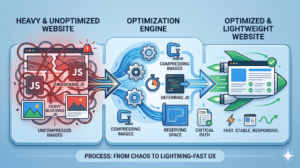
My first target is always images. Gargantuan, uncompressed photos are serial killers of LCP scores. You absolutely must compress those files and serve them up in modern formats like WebP or AVIF. They look identical to standard JPEGs but weigh a fraction of the megabytes. Now, here’s a rookie mistake that drives me crazy: lazy-loading the LCP image. Lazy-loading is pure magic for pictures buried deep in your footer. But your main hero image? Never. You want the browser aggressively fetching that visual the millisecond the page requests it.
Server response time or Time to First Byte (TTFB) is the other invisible elephant in the room. If your bargain-bin web host takes two seconds just to wake up, your LCP is doomed before it starts. Spend the money on decent hosting. Hook up a Content Delivery Network (CDN). A CDN caches your site globally so that when someone in Tokyo clicks your link, they pull the data from a Tokyo server—not a dusty rack sitting in New Jersey.
First Input Delay (FID): Being Responsive and Polite
Ever tapped a “Buy Now” button and… nothing happens? You angrily jab your thumb at the glass three more times. That agonizing lag is what First Input Delay (FID) tracks. It clocks the exact milliseconds between a user’s first interactive action (a tap, a click, a swipe) and the moment the browser actually starts processing the command.
You want an FID under 100 milliseconds. Keep it under that threshold, and the interaction feels utterly seamless to the human brain.
The usual suspect murdering your FID score? Bloated JavaScript. When a browser is choking on massive scripts, the main thread locks up. It’s too busy thinking to acknowledge your tap. The solution is putting your site on a ruthless JS diet. Audit your third-party garbage. Do you genuinely need six different analytics trackers, a bloated chatbot, and a swarming hive of social media widgets loading the instant the page opens? Deferring that non-essential junk until after the core page renders is a total game-changer.
Another lifesaver is slicing up Long Tasks. If a monstrous chunk of JavaScript takes half a second to execute, the browser is essentially paralyzed for those 500 milliseconds. Grab your developer, chop those hefty tasks into bite-sized, asynchronous pieces, and give the browser breathing room to register user clicks. Your FID will thank you.
A quick reality check: Google is actively sunsetting FID in favor of a beefier metric called Interaction to Next Paint (INP). While FID only cared about the first click, INP stalks the responsiveness of every interaction throughout the user’s entire visit. The defensive playbook is mostly the same—taming JavaScript is still your silver bullet—but it’s a massive paradigm shift you need to watch as SEO evolves.
Cumulative Layout Shift (CLS): Keeping Things Steady
Of the three metrics, Cumulative Layout Shift (CLS) is the one most intimately tied to sheer user frustration. It measures visual stability. In plain English: how much does the page unpredictably warp and shift while it’s loading?
The magic number here is a score of 0.1 or lower. High CLS is usually the culprit when a slow-loading ad suddenly pops into existence, violently pushing the paragraph you were reading off the bottom of the screen.
Ironically, CLS is often the easiest metric to cure because the remedies are mostly old-school HTML basics. My go-to fix? Hardcoding width and height attributes back into image tags. When responsive design became trendy, developers got lazy and left those out, letting CSS do the heavy lifting. But without explicit dimensions, the browser has no clue how much vertical space to reserve. It just renders text, downloads the image, and shoves everything down. Add the dimensions back, and the browser draws a blank placeholder box. No shifting.
Dynamically injected junk, like newsletter pop-ups or banner ads, is the other major offender. Got a massive ad slot at the top of your blog? Reserve that empty space in your CSS immediately. Otherwise, the text paints, the reader starts scrolling, and bam – the ad drops in like a piano from a cartoon window, ruining the experience. Always reserve space for dynamic elements.
Finally, watch your custom web fonts. Sometimes the browser flashes a boring fallback font (like Arial) and then aggressively swaps in your fancy custom font a second later. If the two fonts have vastly different kerning or sizing, the whole paragraph abruptly shape-shifts. Using smart font-display rules in your CSS will usually smooth out that jarring swap.
Why We Should Care Deeply About Page Speed Optimization
It’s dangerously easy to treat Core Web Vitals as just another annoying hoop Google is forcing us to jump through. I challenge you to flip that perspective. Tuning these metrics isn’t about feeding a search algorithm. It’s about respecting the time, attention, and sanity of the humans visiting your site.
When you engineer something fast, stable, and reactive, the business metrics follow suit. Bounce rates nosedive because people aren’t staring at blank screens. Conversions spike because the checkout flow feels snappy and secure. Users inherently trust a site that feels premium, and raw, blazing speed is the ultimate hallmark of a premium digital experience.
Optimizing for Core Web Vitals is no longer just an SEO checklist item; it is a fundamental commitment to user experience. When you prioritize how fast a page loads, how quickly it responds, and how stable it feels, you are directly investing in customer trust and higher conversion rates.
Common Mistakes I See When Fixing Core Web Vitals
Having audited more messy codebases than I care to admit, I’ve watched brilliant site owners stumble into the exact same performance traps over and over again.
The biggest rookie error? Treating “Lab Data” like the gospel. Tools like Google Lighthouse simulate a load on a single, controlled machine under artificial network limits. It’s great for hunting bugs, but it’s a sterile environment. Real Core Web Vitals are graded on “Field Data” (the Chrome User Experience Report, or CrUX). This is chaotic, real-world data pulled directly from actual humans using varied devices on spotty coffee shop Wi-Fi. Stop chasing a vanity 100/100 score in Lighthouse and start patching the actual problems showing up in your Field Data.
Another classic blunder is the “more is better” approach to caching plugins. I’ve logged into WordPress sites where the owner installed three different speed optimizers, assuming their effects would stack. They don’t. They violently conflict, break the site’s layout, and actually bog the server down to a crawl. Pick one premium caching tool, learn how to configure it correctly, and leave the rest alone.
The Long-Term Game of Website Performance
Nailing your LCP, FID, and CLS scores isn’t a one-and-done weekend project. Websites are living, breathing things. Marketing demands a new tracking pixel. Writers upload a 5MB unoptimized PNG. A new feature gets rolled out. Slowly but surely, “performance rot” creeps in, dragging your scores back into the red.
To fight this digital entropy, make speed monitoring a non-negotiable habit. Glance at your Search Console Core Web Vitals tab once a month. Throw your highest-traffic pages into PageSpeed Insights after a major redesign. Catching a regression early is vastly cheaper than trying to win back lost organic traffic six months later.
At the end of the day, conquering Core Web Vitals requires radical empathy. Picture a user trying to load your site on a cracked, three-year-old smartphone while riding the subway. How does your site treat them? Build a website that runs beautifully for that specific person, and it will run beautifully for everyone else. It’s a massive win for your readers, your bottom line, and as a happy byproduct, your SEO.
Frequently Asked Questions
What exactly is a “good” LCP score?
Google draws a hard line in the sand: 2.5 seconds or less is “Good.” That means the single largest visual element on a user’s screen—be it a massive headline or a hero image – needs to completely finish painting before the stopwatch hits 2.5 seconds. Anything lagging past the 4.0-second mark gets slapped with a “Poor” rating and requires immediate triage.
Is First Input Delay (FID) being replaced?
Yes, the era of FID is ending! While it was a great stepping stone for measuring interactivity, Google is aggressively pushing a replacement called Interaction to Next Paint (INP). FID was flawed because it only cared about the user’s very first click. INP tracks the latency of every single tap, click, and swipe across the entire lifespan of the page visit. If you haven’t already, pivot your optimization efforts toward INP.
Can I fix my Core Web Vitals if I use WordPress without coding?
100%. While having a seasoned developer on speed dial is incredibly helpful for complex JavaScript knots, non-technical folks can still move mountains. If you invest in premium hosting, convert giant JPEGs to modern formats (like WebP), ensure your editor is injecting width and height tags on images, and install a rock-solid caching plugin, you’ll effortlessly wipe out the vast majority of LCP and CLS errors. Zero code required.
Will perfect Core Web Vitals guarantee a top spot on Google?
Not even close. Think of Core Web Vitals as the ultimate tie-breaker. Google’s core mission is to serve up incredibly relevant, high-value answers. If your article is thin, unhelpful, or off-topic, a flawless 100/100 speed score won’t save it from the abyss. But, if you and a rival site publish equally brilliant content, the website with snappy Core Web Vitals and a silky-smooth user experience is almost guaranteed to snag the higher ranking.